커뮤니티

포인트
쿠폰
내 강의실
국비 신청 내역
증명서
계정
로그아웃
학습 질문
개발 일지
나의 활동
답변 완료
JQuery로 top버튼구현
undefined주차


한*연
댓글
5
・
추천
0
・
조회수
16
조회수
16
답변 완료
안녕하세요
https://aneok.tistory.com/124#
이 블로그의 3번째 문단 <조금복잡하게 만들기>를 참고하여
누르면 페이지 상단으로 이동하는 top 버튼을 만들려고 하는데요
<!DOCTYPE html>
<html lang="ko">
<head>
    <meta charset="UTF-8">
    <title>타이틀</title>
</head>


<style>
    @font-face {
        font-family: 'YUniverse-B';
        src: url('https://cdn.jsdelivr.net/gh/projectnoonnu/noonfonts_yuniverse@1.0/YUniverse-B.woff2') format('woff2');
        font-weight: normal;
        font-style: normal;
        /*폰트 지정*/
    }
    .title {
            margin: 100px 0px 0px -150px;
            display:flex;
            flex-direction: column;
            justify-content: center;
            align-items: center;
        }

    .sub_title {
            margin: 1px 100px 100px 100px;
            display:flex;
            flex-direction: column;
            justify-content: center;
            align-items: center;
        }

    .text {
        color: #B0C4DE;
        margin: 0px 0px 100px 0px;
        display:flex;
        flex-direction: column;
        justify-content: center;
        align-items: center;
        /*이게뭐냐면 글자 가운데 정렬해주는거*/
         }

    a#topBtn {
        position: fixed; /* 포지션 고정 */
        right: 2%; /* 오른쪽에서 2% - %도 할수 있음*/
        bottom: 5px; /* 밑에서 5px */
        display: none; /* 보여지지 없음 - 기본적으로 안보여지게 */
        z-index: 9999; /* 포지션을 먼저 지정후 z-좌표(레이어) : 9999입니다. */
        }
</style>

<script type="text/javascript" src="http://code.jquery.com/jquery-latest.js">
        $(function() { // 보이기 | 숨기기
            $(window).scroll(function() {
            if ($(this).scrollTop() > 250) { //250 넘으면 버튼이 보여짐니다.
              $('#topBtn').fadeIn();
            } else {
              $('#topBtn').fadeOut();
            }
          }); // 버튼 클릭시
          $("#topBtn").click(function() {
            $('html, body').animate({ scrollTop : 0 // 0 까지 animation 이동합니다.
            }, 400); // 속도 400
            return false;
          });
        });
</script>


<body>
    <div class="title" div style="font: bold normal 4.5em/0.6em YUniverse-B;">
        <h1>이곳에는 </h1>
        <h1>ㅤㅤㅤ타이틀 </h1>
    </div>

    <div class="sub_title" div style="font: bold normal 2.0em/0.6em YUniverse-B;">
        <p>서브 타이틀입니다</p>
    </div>

    <a style="topBtn;" href="#"><img src="static/top버턴.png"></a>

    <div class="text" div style="font: 300 normal 1.5em/0.6em YUniverse-B;">
        <p>이곳에 내용을 씁니다</p>
        <p>웅얼웅얼</p>
        <p>1234 1234</p>
    </div>

    <button onclick="location.href='/pic1'">페이지 이동 버튼1</button >
    <button type="button" class="Btn" onClick="location.href='/pic1'">페이지 이동 버튼2</button>
    <button onclick="window.location.href = '/pic2'">페이지 이동 버튼3</button>
</body>
</html>
↑html 코드입니다
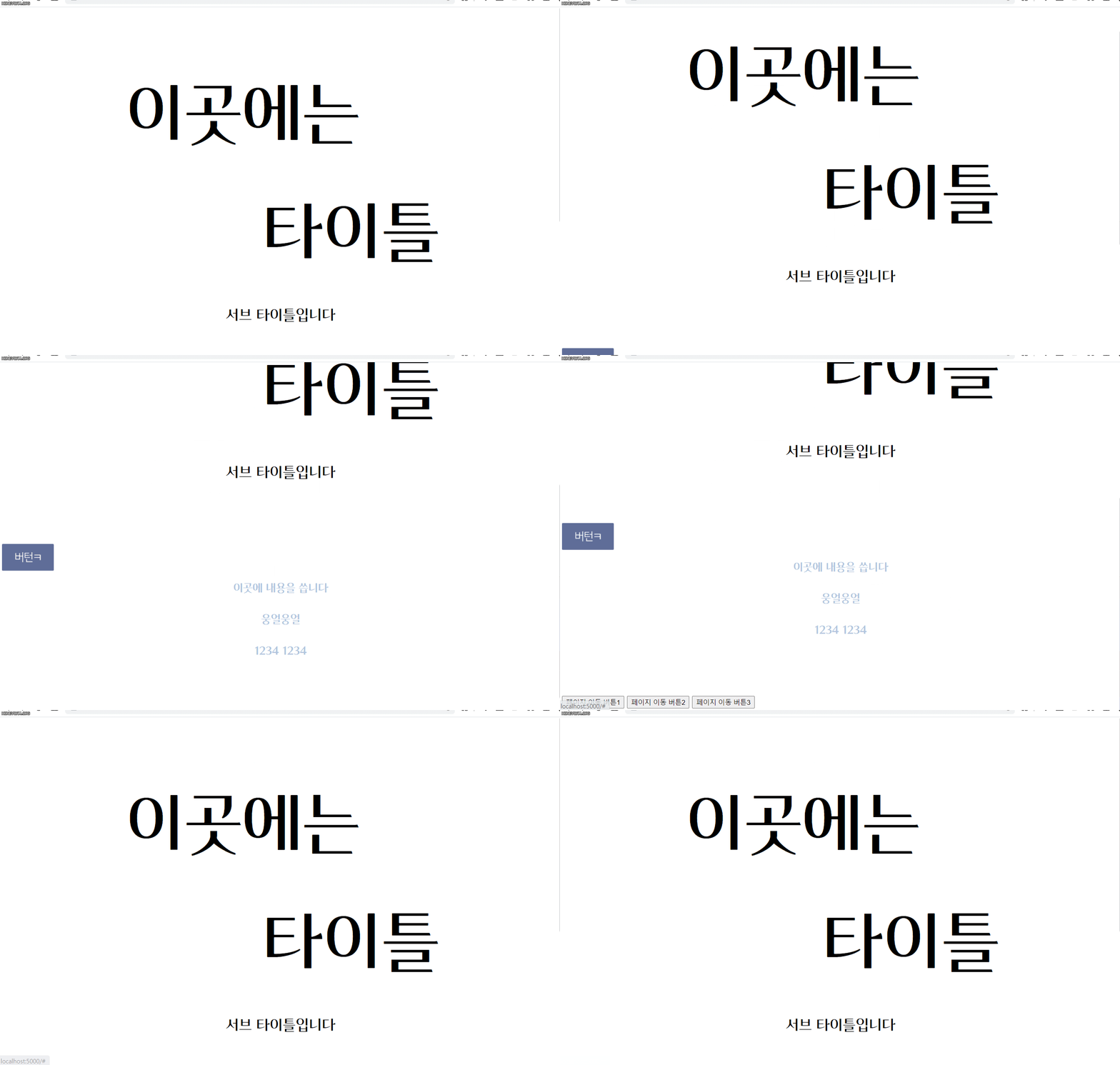
오른쪽 구석에 자연스럽게 나타나는 버튼을 만들고 싶은데
버튼 위치도 이상하고 자연스럽게 이동하지도 않아요
어디가 잘못된걸까요?ㅜㅜ....


댓글 알림
