커뮤니티

포인트
쿠폰
내 강의실
국비 신청 내역
증명서
계정
로그아웃
학습 질문
개발 일지
나의 활동
답변 완료
사이즈문의
undefined주차


연*아
댓글
5
・
추천
0
・
조회수
19
조회수
19
답변 완료
사주차 과제를 하면서 궁금한게 생겨서요
max-width는 항상 500px로 주라고 2주차? 3주차때 그러셨는데
- 그게 왜 그런지요!
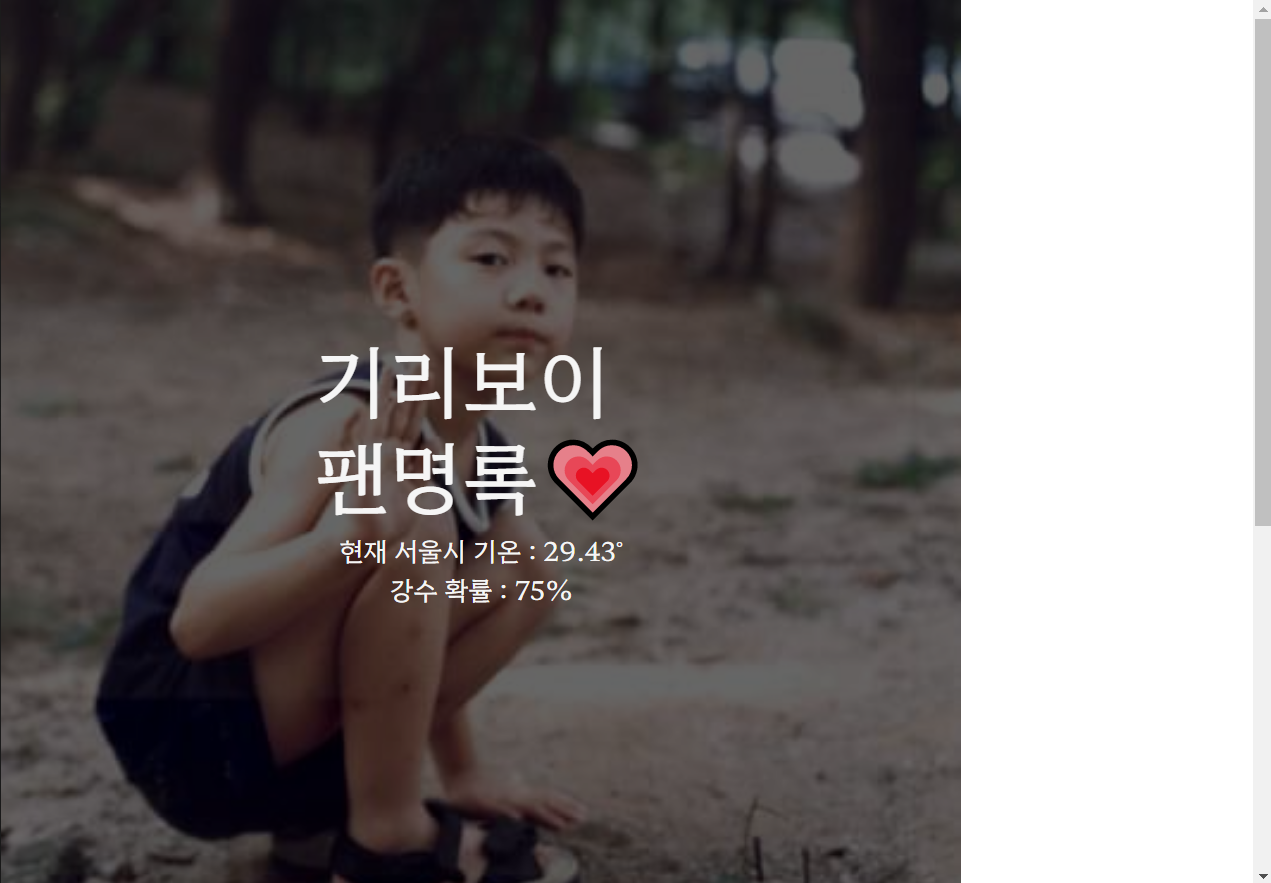
그래서 넣었는데. width를 100%를 주었는데
2. 아예 처음부터 max-width:758px이 적용되어 이미지가 잘립니다. 왜그런가요
<!doctype html>
<html lang="en">

<head>
    <meta charset="utf-8">
    <meta name="viewport" content="width=device-width, initial-scale=1, shrink-to-fit=no">

    <link href="https://cdn.jsdelivr.net/npm/bootstrap@5.0.2/dist/css/bootstrap.min.css" rel="stylesheet"
          integrity="sha384-EVSTQN3/azprG1Anm3QDgpJLIm9Nao0Yz1ztcQTwFspd3yD65VohhpuuCOmLASjC" crossorigin="anonymous">
    <script src="https://ajax.googleapis.com/ajax/libs/jquery/3.5.1/jquery.min.js"></script>
    <script src="https://cdn.jsdelivr.net/npm/bootstrap@5.0.2/dist/js/bootstrap.bundle.min.js"
            integrity="sha384-MrcW6ZMFYlzcLA8Nl+NtUVF0sA7MsXsP1UyJoMp4YLEuNSfAP+JcXn/tWtIaxVXM"
            crossorigin="anonymous"></script>

    <!--Black+Han+Sans 폰트-->
    <link href="https://fonts.googleapis.com/css2?family=Black+Han+Sans&family=Gowun+Batang&family=Hahmlet&display=swap"
          rel="stylesheet">

    <title>기리보이 팬명록</title>
    <style>

        body {
            font-family: 'Hahmlet', serif;
        }

        /*팬명록 text*/
        .mytitle > h1 {
            font-size: 4rem;
        }

        /*서울시 온도 API*/
        #temp {
            font-size: 1.3rem;
        }

        /*헤더영역*/
        .mytitle {
            width: 100%;
            height: 768px;
            max-width: 768px;
            background-image: linear-gradient(0deg, rgba(0, 0, 0, 0.6), rgba(0, 0, 0, 0.6)), url('https://scontent-ssn1-1.xx.fbcdn.net/v/t1.6435-9/93653847_2998553740211630_2308237436301344768_n.jpg?stp=cp0_dst-jpg_e15_p403x403_q65&_nc_cat=111&ccb=1-7&_nc_sid=8024bb&_nc_ohc=DlQ7yHxXoFIAX8O9XdK&_nc_ht=scontent-ssn1-1.xx&oh=00_AT-ZoUhFMw-JL_A_L0DBGVjLceuiSMhfJSZbNjYrhNyo6Q&oe=6321EC6B');
            background-position: center;
            background-size: cover;
            color: whitesmoke;
            display: flex;
            flex-direction: column;
            align-items: center;
            justify-content: center;
        }

        .sectionwarp > p {
            margin-top: 100px;
            text-align: center;
            font-size: 30px;
        }

        #chrbtn {
            font-size: 17px;
            padding: 10px
        }

        /*카드 섹션*/
        .mysection {
            border: 1px solid darkgray;
            width: 35%;
            margin: 50px auto;
            padding: 1%;
            display: none;
        }

        .mysection > button {
            margin: 10px auto;
        }

        .myfooter {
            border: 1px solid darkgray;
            font-size: 10px;
            margin-bottom: 1.5%;
        }

        .blockquote > p {
            font-size: 16px;
        }

        .blockquote > :last-child {
            font-size: 15px;
        }

        .mylastfooter {
            margin: 100px 0 auto;
        }


    </style>

    <script>


        $.ajax({
            type: "GET",
            url: "http://spartacodingclub.shop/sparta_api/weather/seoul",
            data: {},
            success: function (response) {
                let temps = response['temp']
                let cloud = response['clouds']

                $('#temp').append('현재 서울시 기온 : ' + temps + '˚' + `<br>` + '강수 확률 : ' + cloud);
                $('#temp').addClass('text-center');
            }
        })

        function chrbtn() {
            $('#sectionwarp').show();
        }

        function closebtn() {
            $('#sectionwarp').hide();
        }


    </script>
</head>

<body>

<!--헤더 시작-->
<div class="mytitle">
    <h1>기리보이<br/>팬명록💗</h1>
    <p id="temp"></p>
</div>
<!--헤더 끝-->

<!--카드 전체 시작-->
<div class="sectionwarp">
    <p>To. IU</p>
    <div class="d-grid gap-2 col-1 mx-auto">
        <button id="chrbtn" onclick="chrbtn()" type="button"
                class="btn btn-outline-danger">응원남기기
        </button>
    </div>
    <!--카드 중간 시작-->
    <div id="sectionwarp" class="mysection">
        <div class="mb-3">
            <label for="exampleFormControlInput1" class="form-label"></label>
            <input type="email" class="form-control" id="exampleFormControlInput1" placeholder="닉네임">
        </div>
        <div class="mb-3">
            <label for="exampleFormControlTextarea1" class="form-label"></label>
            <textarea class="form-control" id="exampleFormControlTextarea1" placeholder="응원댓글" rows="3"></textarea>
        </div>

        <button type="button" class="btn btn-danger">확인</button>

        <!--댓글 시작-->
        <div class="myfooter">
            <div class="card-body">
                <blockquote class="blockquote mb-0">
                    <p>역시 기리보이!</p>
                    <footer class="blockquote-footer">홍셩팬</footer>
                </blockquote>
            </div>
        </div>

        <!--댓글 끝-->
    </div>
    <!--카드 중간 끝-->
</div>
<!--카드 전체 끝-->

<!--푸터 시작-->

<div class="mylastfooter">
    <div class="card text-center">
        <div class="card-body">
            <h5 class="card-title">EDAM</h5>
            <p class="card-text">With supporting text below as a natural lead-in to additional content.</p>
        </div>
    </div>
</div>
<!--푸터 끝-->

</body>
</html>


댓글 알림
