커뮤니티

포인트
쿠폰
내 강의실
국비 신청 내역
증명서
계정
로그아웃
학습 질문
개발 일지
나의 활동
답변 완료
4-12 app.py 와 index.html 다 완성후 호스팅 시 오류가 뜹니다
undefined주차


구*현
댓글
1
・
추천
0
・
조회수
22
조회수
22
답변 완료
선생님 강의에 따르면 아래와 같이 이미지가 뜨고, 몽고 db에 데이터가 저장되야 하는데
아래 이미지도 안뜨고 몽고 db에도 데이터가 안 들어갔습니다 뭐가 문제일까요 ?
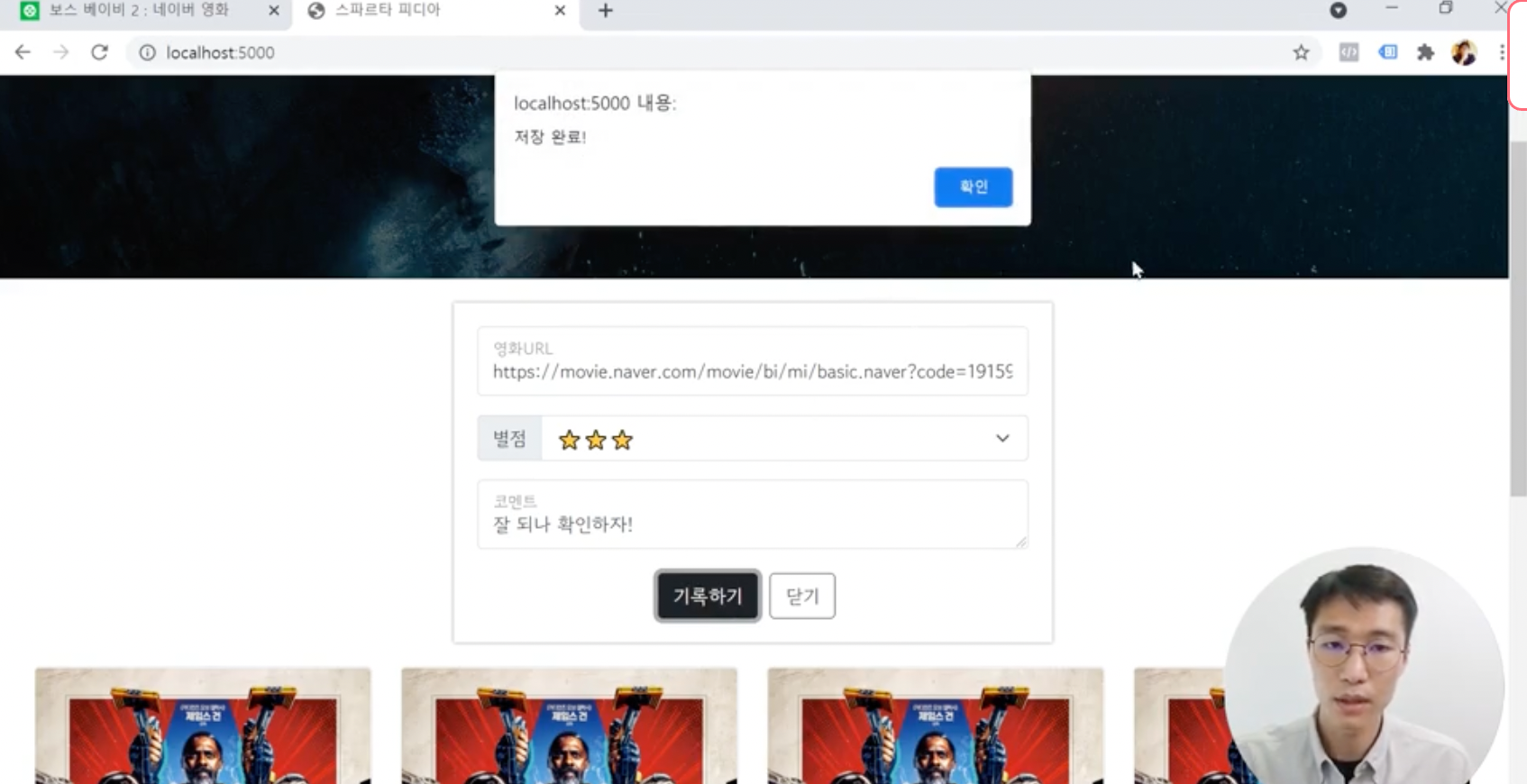
제가 작성한 app.py 코드
from flask import Flask, render_template, request, jsonify
app = Flask(__name__)

import requests
from bs4 import BeautifulSoup

from pymongo import MongoClient
client = MongoClient('mongodb+srv://test:sparta@cluster0.erkgkxi.mongodb.net/Cluster0?retryWrites=true&w=majority')
db = client.dbsparta

@app.route('/')
def home():
    return render_template('index.html')

@app.route("/movie", methods=["POST"])
def movie_post():
    url_receive = request.form['url_give']
    star_receive = request.form['star_give']
    comment_receive = request.form['comment_give']

    headers = {
        'User-Agent' : 'Mozilla/5.0 (Windows NT 10.0; Win64; x64)AppleWebKit/537.36 (KHTML, like Gecko) Chrome/73.0.3683.86 Safari/537.36'}
    data = requests.get(url_receive,headers=headers)

    soup = BeautifulSoup(data.text, 'html.parser')

    title = soup.select_one('meta[property="og:title"]')['content']
    image = soup.select_one('meta[property="og:image"]')['content']
    desc = soup.select_one('meta[property="og:description"]')['content']

    doc = {
        'title':title,
        'image':image,
        'desc': desc,
        'star':star_receive,
        'comment':comment_receive

    }

    db.movies.insert_one(doc)

    return jsonify({'msg':'저장완료!'})

if __name__ == '__main__':
    app.run('0.0.0.0', port=5000, debug=True)
제가 작성한 index.html 코드
<!doctype html>
<html lang="en">

<head>
    <meta charset="utf-8">
    <meta name="viewport" content="width=device-width, initial-scale=1, shrink-to-fit=no">

    <link href="https://cdn.jsdelivr.net/npm/bootstrap@5.0.2/dist/css/bootstrap.min.css" rel="stylesheet"
          integrity="sha384-EVSTQN3/azprG1Anm3QDgpJLIm9Nao0Yz1ztcQTwFspd3yD65VohhpuuCOmLASjC" crossorigin="anonymous">
    <script src="https://ajax.googleapis.com/ajax/libs/jquery/3.5.1/jquery.min.js"></script>
    <script src="https://cdn.jsdelivr.net/npm/bootstrap@5.0.2/dist/js/bootstrap.bundle.min.js"
            integrity="sha384-MrcW6ZMFYlzcLA8Nl+NtUVF0sA7MsXsP1UyJoMp4YLEuNSfAP+JcXn/tWtIaxVXM"
            crossorigin="anonymous"></script>

    <title>스파르타 피디아</title>

    <link href="https://fonts.googleapis.com/css2?family=Gowun+Dodum&display=swap" rel="stylesheet">

    <style>
        * {
            font-family: 'Gowun Dodum', sans-serif;
        }

        .mytitle {
            width: 100%;
            height: 250px;

            background-image: linear-gradient(0deg, rgba(0, 0, 0, 0.5), rgba(0, 0, 0, 0.5)), url('https://movie-phinf.pstatic.net/20210715_95/1626338192428gTnJl_JPEG/movie_image.jpg');
            background-position: center;
            background-size: cover;

            color: white;

            display: flex;
            flex-direction: column;
            align-items: center;
            justify-content: center;
        }

        .mytitle > button {
            width: 200px;
            height: 50px;

            background-color: transparent;
            color: white;

            border-radius: 50px;
            border: 1px solid white;

            margin-top: 10px;
        }

        .mytitle > button:hover {
            border: 2px solid white;
        }

        .mycomment {
            color: gray;
        }

        .mycards {
            margin: 20px auto 0px auto;
            width: 95%;
            max-width: 1200px;
        }

        .mypost {
            width: 95%;
            max-width: 500px;
            margin: 20px auto 0px auto;
            padding: 20px;
            box-shadow: 0px 0px 3px 0px gray;

            display: none;
        }

        .mybtns {
            display: flex;
            flex-direction: row;
            align-items: center;
            justify-content: center;

            margin-top: 20px;
        }

        .mybtns > button {
            margin-right: 10px;
        }
    </style>
    <script>
        $(document).ready(function () {
            listing();
        });

        function listing() {
            $.ajax({
                type: 'GET',
                url: '/movie',
                data: {},
                success: function (response) {
                    alert(response['msg'])
                }
            })
        }

        function posting() {
            let url = $('#url').val()
            let  star= $('#star').val()
            let comment = $('#comment').val()

            $.ajax({
                type: 'POST',
                url: '/movie',
                data: {url_give: 'url', star_give: 'star', comment_give : 'comment'},
                success: function (response) {
                    alert(response['msg'])
                    window.location.relaod()
                }
            });
        }

        function open_box() {
            $('#post-box').show()
        }

        function close_box() {
            $('#post-box').hide()
        }
    </script>
</head>

<body>
<div class="mytitle">
    <h1>내 생애 최고의 영화들</h1>
    <button onclick="open_box()">영화 기록하기</button>
</div>
<div class="mypost" id="post-box">
    <div class="form-floating mb-3">
        <input id="url" type="email" class="form-control" placeholder="name@example.com">
        <label>영화URL</label>
    </div>
    <div class="input-group mb-3">
        <label class="input-group-text" for="inputGroupSelect01">별점</label>
        <select class="form-select" id="star">
            <option selected>-- 선택하기 --</option>
            <option value="1">⭐</option>
            <option value="2">⭐⭐</option>
            <option value="3">⭐⭐⭐</option>
            <option value="4">⭐⭐⭐⭐</option>
            <option value="5">⭐⭐⭐⭐⭐</option>
        </select>
    </div>
    <div class="form-floating">
        <textarea id="comment" class="form-control" placeholder="Leave a comment here"></textarea>
        <label for="floatingTextarea2">코멘트</label>
    </div>
    <div class="mybtns">
        <button onclick="posting()" type="button" class="btn btn-dark">기록하기</button>
        <button onclick="close_box()" type="button" class="btn btn-outline-dark">닫기</button>
    </div>
</div>
<div class="mycards">
    <div class="row row-cols-1 row-cols-md-4 g-4" id="cards-box">
        <div class="col">
            <div class="card h-100">
                <img src="https://movie-phinf.pstatic.net/20210728_221/1627440327667GyoYj_JPEG/movie_image.jpg"
                     class="card-img-top">
                <div class="card-body">
                    <h5 class="card-title">영화 제목이 들어갑니다</h5>
                    <p class="card-text">여기에 영화에 대한 설명이 들어갑니다.</p>
                    <p>⭐⭐⭐</p>
                    <p class="mycomment">나의 한줄 평을 씁니다</p>
                </div>
            </div>
        </div>
        <div class="col">
            <div class="card h-100">
                <img src="https://movie-phinf.pstatic.net/20210728_221/1627440327667GyoYj_JPEG/movie_image.jpg"
                     class="card-img-top">
                <div class="card-body">
                    <h5 class="card-title">영화 제목이 들어갑니다</h5>
                    <p class="card-text">여기에 영화에 대한 설명이 들어갑니다.</p>
                    <p>⭐⭐⭐</p>
                    <p class="mycomment">나의 한줄 평을 씁니다</p>
                </div>
            </div>
        </div>
        <div class="col">
            <div class="card h-100">
                <img src="https://movie-phinf.pstatic.net/20210728_221/1627440327667GyoYj_JPEG/movie_image.jpg"
                     class="card-img-top">
                <div class="card-body">
                    <h5 class="card-title">영화 제목이 들어갑니다</h5>
                    <p class="card-text">여기에 영화에 대한 설명이 들어갑니다.</p>
                    <p>⭐⭐⭐</p>
                    <p class="mycomment">나의 한줄 평을 씁니다</p>
                </div>
            </div>
        </div>
        <div class="col">
            <div class="card h-100">
                <img src="https://movie-phinf.pstatic.net/20210728_221/1627440327667GyoYj_JPEG/movie_image.jpg"
                     class="card-img-top">
                <div class="card-body">
                    <h5 class="card-title">영화 제목이 들어갑니다</h5>
                    <p class="card-text">여기에 영화에 대한 설명이 들어갑니다.</p>
                    <p>⭐⭐⭐</p>
                    <p class="mycomment">나의 한줄 평을 씁니다</p>
                </div>
            </div>
        </div>
    </div>
</div>
</body>

</html>
제 코드로 실행 눌렀을 때 나오는 오류 내용
/Users/gytty/Desktop/Sparta/projects/movie/venv/bin/python /Users/gytty/Desktop/Sparta/projects/movie/app.py
 * Serving Flask app 'app'
 * Debug mode: on
WARNING: This is a development server. Do not use it in a production deployment. Use a production WSGI server instead.
 * Running on all addresses (0.0.0.0)
 * Running on http://127.0.0.1:5000
 * Running on http://192.168.0.9:5000
Press CTRL+C to quit
 * Restarting with stat
 * Debugger is active!
 * Debugger PIN: 143-971-955
127.0.0.1 - - [17/Aug/2022 23:10:13] "GET / HTTP/1.1" 200 -
127.0.0.1 - - [17/Aug/2022 23:10:13] "GET /movie HTTP/1.1" 405 -
127.0.0.1 - - [17/Aug/2022 23:10:23] "POST /movie HTTP/1.1" 500 -
Traceback (most recent call last):
  File "/Users/gytty/Desktop/Sparta/projects/movie/venv/lib/python3.8/site-packages/flask/app.py", line 2548, in __call__
    return self.wsgi_app(environ, start_response)
  File "/Users/gytty/Desktop/Sparta/projects/movie/venv/lib/python3.8/site-packages/flask/app.py", line 2528, in wsgi_app
    response = self.handle_exception(e)
  File "/Users/gytty/Desktop/Sparta/projects/movie/venv/lib/python3.8/site-packages/flask/app.py", line 2525, in wsgi_app
    response = self.full_dispatch_request()
  File "/Users/gytty/Desktop/Sparta/projects/movie/venv/lib/python3.8/site-packages/flask/app.py", line 1822, in full_dispatch_request
    rv = self.handle_user_exception(e)
  File "/Users/gytty/Desktop/Sparta/projects/movie/venv/lib/python3.8/site-packages/flask/app.py", line 1820, in full_dispatch_request
    rv = self.dispatch_request()
  File "/Users/gytty/Desktop/Sparta/projects/movie/venv/lib/python3.8/site-packages/flask/app.py", line 1796, in dispatch_request
    return self.ensure_sync(self.view_functions[rule.endpoint])(**view_args)
  File "/Users/gytty/Desktop/Sparta/projects/movie/app.py", line 23, in movie_post
    data = requests.get(url_receive,headers=headers)
  File "/Users/gytty/Desktop/Sparta/projects/movie/venv/lib/python3.8/site-packages/requests/api.py", line 73, in get
    return request("get", url, params=params, **kwargs)
  File "/Users/gytty/Desktop/Sparta/projects/movie/venv/lib/python3.8/site-packages/requests/api.py", line 59, in request
    return session.request(method=method, url=url, **kwargs)
  File "/Users/gytty/Desktop/Sparta/projects/movie/venv/lib/python3.8/site-packages/requests/sessions.py", line 573, in request
    prep = self.prepare_request(req)
  File "/Users/gytty/Desktop/Sparta/projects/movie/venv/lib/python3.8/site-packages/requests/sessions.py", line 484, in prepare_request
    p.prepare(
  File "/Users/gytty/Desktop/Sparta/projects/movie/venv/lib/python3.8/site-packages/requests/models.py", line 368, in prepare
    self.prepare_url(url, params)
  File "/Users/gytty/Desktop/Sparta/projects/movie/venv/lib/python3.8/site-packages/requests/models.py", line 439, in prepare_url
    raise MissingSchema(
requests.exceptions.MissingSchema: Invalid URL 'url': No scheme supplied. Perhaps you meant http://url?


댓글 알림
