커뮤니티

포인트
쿠폰
내 강의실
국비 신청 내역
증명서
계정
로그아웃
학습 질문
개발 일지
나의 활동
답변 완료
1-9번 강의에 대한 문의입니다.
undefined주차


범*진
댓글
4
・
추천
1
・
조회수
8
조회수
8
답변 완료
강의예시에서는 상단과 하단이 저절로 띄어져서 중앙정렬이 되던데 제 화면에서는 이런식으로 출력됩니다.
쌤 코드소스랑 비교해봤는데 틀린점을 못찾겠더라고요. 뭐가 문제인건가요.ㅠㅠㅠㅠ
<!doctype html>
<html lang="en">

<head>
<meta charset="utf-8">
<meta name="viewport" content="width=device-width, initial-scale=1, shrink-to-fit=no">

<link href="https://cdn.jsdelivr.net/npm/bootstrap@5.0.2/dist/css/bootstrap.min.css" rel="stylesheet"
integrity="sha384-EVSTQN3/azprG1Anm3QDgpJLIm9Nao0Yz1ztcQTwFspd3yD65VohhpuuCOmLASjC" crossorigin="anonymous">
<script src="https://ajax.googleapis.com/ajax/libs/jquery/3.5.1/jquery.min.js"></script>
<script src="https://cdn.jsdelivr.net/npm/bootstrap@5.0.2/dist/js/bootstrap.bundle.min.js"
integrity="sha384-MrcW6ZMFYlzcLA8Nl+NtUVF0sA7MsXsP1UyJoMp4YLEuNSfAP+JcXn/tWtIaxVXM"
crossorigin="anonymous"></script>

<title>스파르타코딩클럽 | 부트스트랩 연습하기</title>
    <link href="https://fonts.googleapis.com/css2?family=Gowun+Dodum&display=swap" rel="stylesheet">

</head>
 <style>
     * {
    font-family: 'Gowun Dodum', sans-serif;
    }
     .mytitle {
         background-color: green;

         width: 100%;
         height: 250px;

         background-image: linear-gradient(0deg, rgba(0, 0, 0, 0.5), rgba(0, 0, 0, 0.5)),url("https://movie-phinf.pstatic.net/20210715_95/1626338192428gTnJl_JPEG/movie_image.jpg");
         background-position: center;
         background-size: cover;

         color: white;

         display: flex;
         flex-direction: column;
         justify-items: center;
         align-items: center;
     }
     .mytitle > button {
         width: 200px;
         height: 50px;

         background-color: transparent;
         color: white;

         border-radius: 50px;

         border: 1px solid white;
     }
     .mytitle > button:hover {
         border: 2px solid white;
     }

 </style>
<body>
 <div class="mytitle">
     <h1>내 생애 최고의 영화들</h1>
     <button>영화 기록하기</button>
 </div>

</body>

</html>
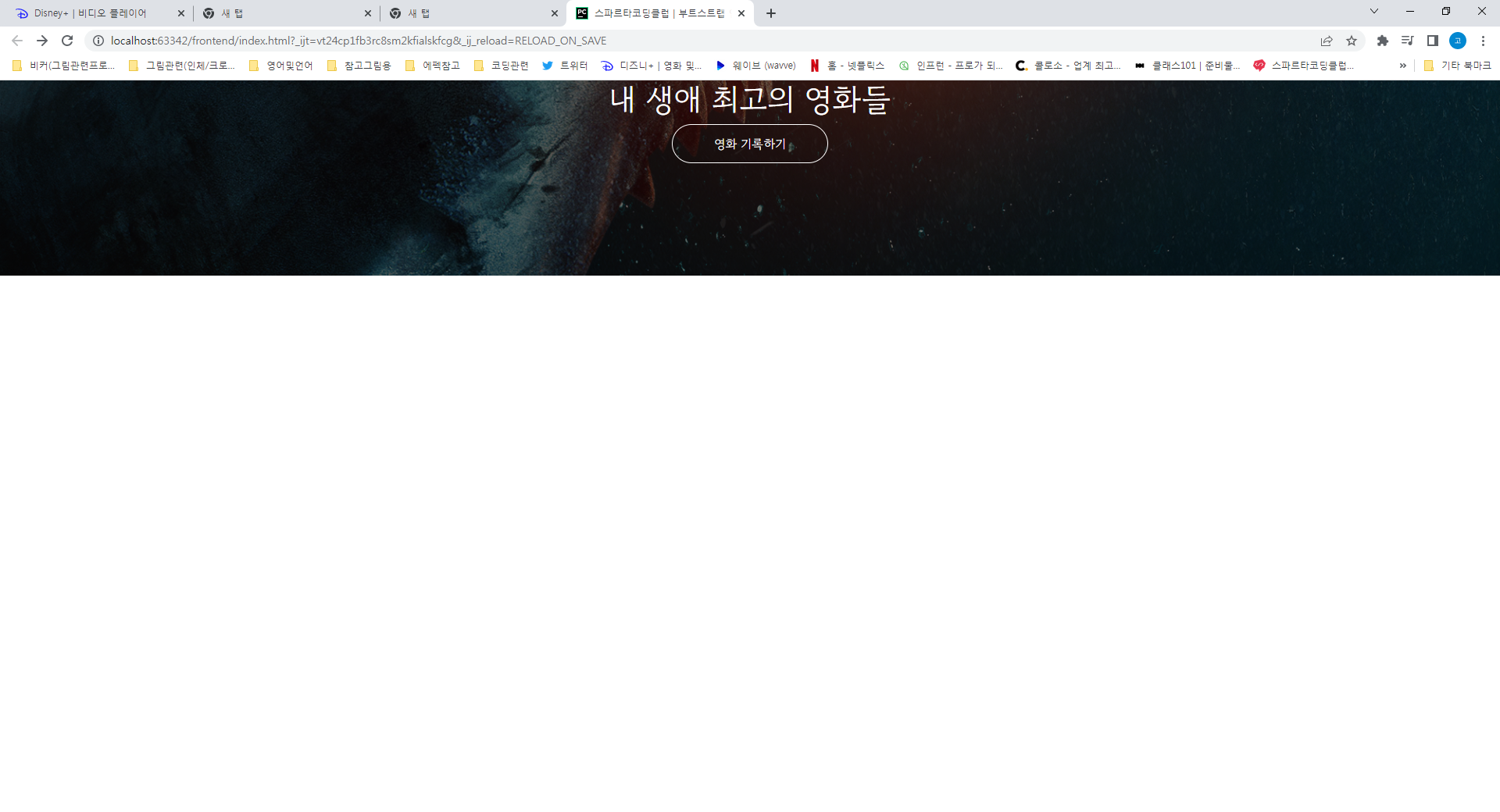
이 저절로 띄워져서 중앙정렬되던데 저는 화면캡쳐처럼 됩니다.


댓글 알림
