커뮤니티

포인트
쿠폰
내 강의실
국비 신청 내역
증명서
계정
로그아웃
학습 질문
개발 일지
나의 활동
답변 완료
5주차 500에러 관련해서 질문있습니다.
undefined주차


이*환
댓글
26
・
추천
0
・
조회수
83
조회수
83
답변 완료
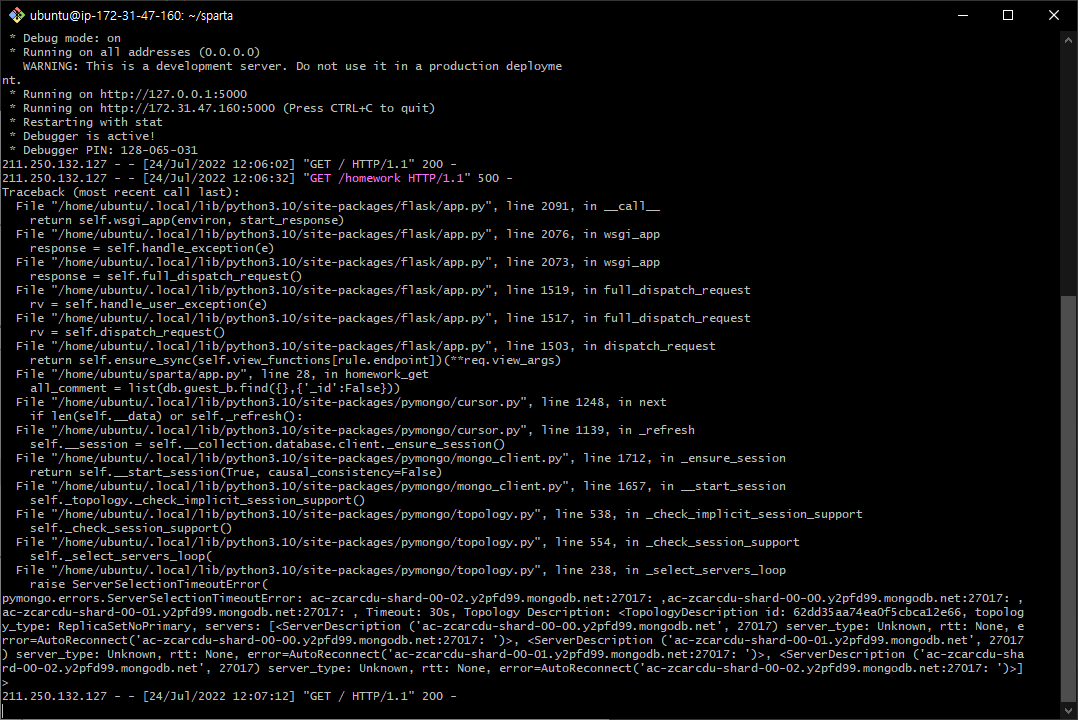
4주차에 만든 팬명록 숙제를 서버로 실행하는 과정에서 500에러가 발생합니다.
과제 자체를 로컬에서 테스트하면 응원 남기기와 불러오기 등이 잘 작동하지만 깃배시에서 app.py파일을 실행했을때에만
get에서 멈춰있다가 타임아웃에러가 생깁니다.
faq에서는 서버관련 오류라고 봤었는데 해결방법이 있는지 궁금합니다.
현재 여기서 막혀서 다음 강의를 진행하지 못하고있습니다..
아래는 4주차 과제로 사용한 코드입니다.
app.py
from flask import Flask, render_template, request, jsonify
app = Flask(__name__)

from pymongo import MongoClient
client = MongoClient('mongodb+srv://test:sparta@cluster0.y2pfd99.mongodb.net/?retryWrites=true&w=majority')
db = client.dbsparta

@app.route('/')
def home():
    return render_template('index.html')

@app.route("/homework", methods=["POST"])
def homework_post():
    name_receive = request.form['name_give']
    comment_receive = request.form['comment_give']
    print(name_receive, comment_receive)

    doc = {
        'name' : name_receive,
        'comment' : comment_receive
    }
    db.guest_b.insert_one(doc)

    return jsonify({'msg':'포스팅 완료!'})

@app.route("/homework", methods=["GET"])
def homework_get():
    all_comment = list(db.guest_b.find({},{'_id':False}))
    return jsonify({'all_comment':all_comment})

if __name__ == '__main__':
    app.run('0.0.0.0', port=5000, debug=True)
index.html
<!DOCTYPE html>
<html lang="en">
<head>
    <meta charset="UTF-8">
    <meta http-equiv="X-UA-Compatible" content="IE=edge">
    <meta name="viewport" content="width=device-width, initial-scale=1.0">

    <link href="https://cdn.jsdelivr.net/npm/bootstrap@5.0.2/dist/css/bootstrap.min.css" rel="stylesheet"
          integrity="sha384-EVSTQN3/azprG1Anm3QDgpJLIm9Nao0Yz1ztcQTwFspd3yD65VohhpuuCOmLASjC" crossorigin="anonymous">
    <script src="https://ajax.googleapis.com/ajax/libs/jquery/3.5.1/jquery.min.js"></script>
    <script src="https://cdn.jsdelivr.net/npm/bootstrap@5.0.2/dist/js/bootstrap.bundle.min.js"
            integrity="sha384-MrcW6ZMFYlzcLA8Nl+NtUVF0sA7MsXsP1UyJoMp4YLEuNSfAP+JcXn/tWtIaxVXM"
            crossorigin="anonymous"></script>

    <title>초미니홈피 - 팬명록</title>

    <link href="https://fonts.googleapis.com/css2?family=Noto+Serif+KR:wght@200;300;400;500;600;700;900&display=swap" rel="stylesheet">
    <style>
        * {
            font-family: 'Noto Serif KR', serif;
        }
        .mypic {
            width: 100%;
            height: 300px;

            background-image: linear-gradient(0deg, rgba(0, 0, 0, 0.5), rgba(0, 0, 0, 0.5)), url('https://image1.marpple.co/files/u_1573399/2021/6/original/4feab759e9efed0eff1a8de73c863a227ce500721.jpg?w=750&f=webp');
            background-position: center 30%;
            background-size: cover;

            color: white;

            display: flex;
            flex-direction: column;
            align-items: center;
            justify-content: center;
        }

        .mypost {
            width: 95%;
            max-width: 500px;
            margin: 20px auto 20px auto;

            box-shadow: 0px 0px 3px 0px black;
            padding: 20px;
        }

        .mypost > button {
            margin-top: 15px;
        }

        .mycards {
            width: 95%;
            max-width: 500px;
            margin: auto;
        }

        .mycards > .card {
            margin-top: 10px;
            margin-bottom: 10px;
        }
    </style>
    <script>
        $(document).ready(function(){
            set_temp()
            show_comment()
        });
        function set_temp(){
            $.ajax({
                type: "GET",
                url: "http://spartacodingclub.shop/sparta_api/weather/seoul",
                data: {},
                success: function (response) {
                    $('#temp').text(response['temp'])
                }
            })
        }
        function save_comment(){
            let name = $('#name').val()
            let comment = $('#comment').val()

            $.ajax({
                type: 'POST',
                url: '/homework',
                data: {'name_give': name, 'comment_give': comment},
                success: function (response) {
                    alert(response['msg'])
                    window.location.reload()
                }
            })
        }
        function show_comment(){
            $('#comment-list').empty()
            $.ajax({
                type: "GET",
                url: "/homework",
                data: {},
                success: function (response) {
                    let rows = response['all_comment']
                    for (let i = 0; i < rows.length; i++) {
                        let name = rows[i]['name']
                        let comment = rows[i]['comment']

                        let temp_html = `<div class="card">
                                            <div class="card-body">
                                                <blockquote class="blockquote mb-0">
                                                    <p>${comment}</p>
                                                    <footer class="blockquote-footer">${name}</footer>
                                                </blockquote>
                                            </div>
                                        </div>`

                        $('#comment-list').append(temp_html)
                    }
                }
            });
        }
    </script>
</head>
<body>
<div class="mypic">
    <h1>10cm 팬명록</h1>
    <p>현재기온: <span id="temp">36</span>도</p>
</div>
<div class="mypost">
    <div class="form-floating mb-3">
        <input type="text" class="form-control" id="name" placeholder="url">
        <label for="floatingInput">닉네임</label>
    </div>
    <div class="form-floating">
<textarea class="form-control" placeholder="Leave a comment here" id="comment"
          style="height: 100px"></textarea>
        <label for="floatingTextarea2">응원댓글</label>
    </div>
    <button onclick="save_comment()" type="button" class="btn btn-dark">응원 남기기</button>
</div>
<div class="mycards" id="comment-list">

</div>
</body>
</html>


댓글 알림
